Placement Targeting History – the change history for publishers and placements.
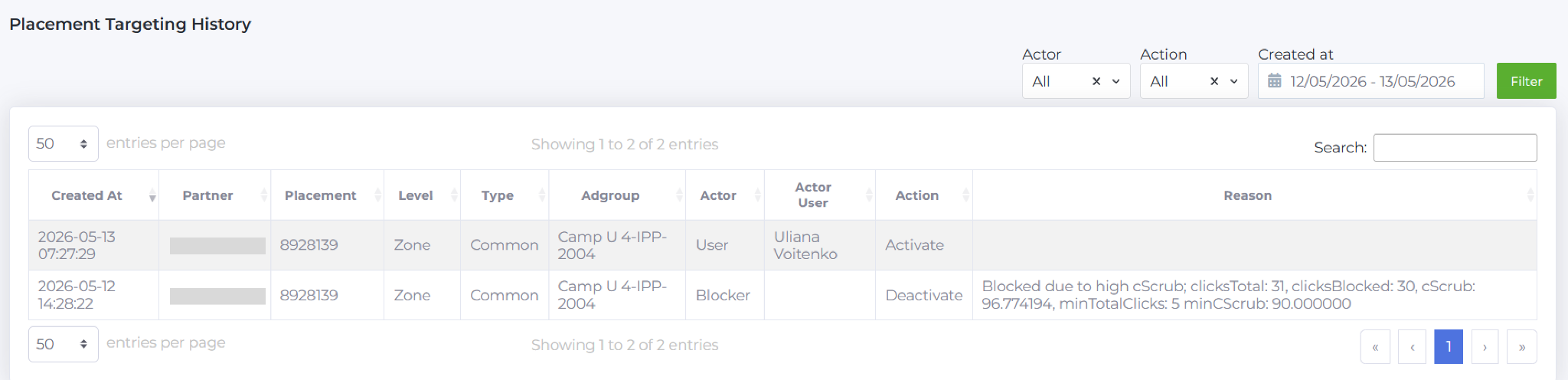
- Created at: date and time of the change.
- Partner: the partner where the change was made.
- Placement: the name of the publisher or placement.
- Level: the level of the element – publisher or placement.
- Type: type of placement; for Google Ads it will show – YouTube channel / app / website, etc., for other sources it will be displayed as – common.
- Adgroup: the name of the ad group where the change occurred.
- Actor: who performed the action: User – manually by the user, Optimizer – by the optimization tool (Optimisation Campaigns, Placement Excluder), Blocker – automatic blocking by the system.
- Actor User: the username in Babkee system, if the action was performed manually.
- Action: the action – Activate (enabled); Deactivate (disabled).
- Reason: the reason for the deactivation/blocking.
FILTERS

- Actor: who performed the action.
- Action: publisher/placement status.
- Created at: period of time (by default, changes for the last 2 days are shown, but you can select your own period).
Example entries:
1. The publisher was blocked by the system on 2026-05-12 according to the rule Clicks>5, cScrub>90%, and then was reactivated by the user on 2026-05-13.

2. The publisher was automatically disabled and blocked according to the rule: Passed Clicks <0, CPA>1.2.

3. The publisher was automatically stopped and banned according to the rule: Clicks >5, cScrub >90%.

The Back to List button takes the user back to the Source Placement Adgroup Report page.