
Campaign Generator Requests is a tool for automatic campaign upload to a selected traffic source. You can view all created requests by ad group, track their current status, and export data, for example, for campaigns that require pre-approval.
You can access the tool via: Tools → Campaign Generator → Campaign Generator Requests.
Columns:
Name – the name of the request (if not specified, the field remains empty).
Source – traffic source (Google Ads, Zemanta, etc.)
Ad Format – ad format
Upload Type – upload type (Manual or Template)
Status – main request status:
- Draft – request is saved but not sent for generation. Ad groups can be edited.
- Pending – request is in queue for generation. Editing is available.
- In Progress – request is being processed. Editing and stopping are not available, only viewing.
- Success – all campaigns are successfully generated. Editing is not available, only view or archive.
- Failed – request finished with an error. Editing is available.
- Partially Success – partial success. Some ad groups are "Success", and at least one is "Failed". Editing is available.
- Stopped – request is stopped. Editing is available.
- Archived – request is archived, no further actions are possible, editing is not available.
Note: To check the current status of the request, please refresh the page.
- For Success status, you will receive a push notification about the successful generation of the request.
- For Failed status, you will receive a push notification with information about errors in the request.
- For Partially Success status, you will receive a push notification about the partial completion of the request.
Message – a message about the current status of request generation.
Last Generated Date Time - the time when the request generation was completed.
Created At – a request creation date.
Updated At – last update date for the request.
Actions – buttons for managing the main request:
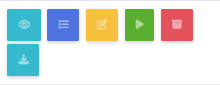
- View – view request.
- View Campaign Items – see campaign statuses inside the request.
- Edit – edit the request.
- Archive – archive the request.
- Export – export the data.
- Generate – start generation if the request has Draft status.
Filters for Source, Ad Format, Upload Type, and Status are available to work with requests.
If you want to find a specific request, enter its name in Search field for a quick search.
Campaign Generator Request Items page displays a list of ad groups contained within the request.
Columns:
Status – status of the ad group:
- Pending – waiting for generation; editing is available if the main request allows it.
- In Progress – ad group is being generated; editing is not available.
- Success – ad group successfully generated; only archiving is available.
- Failed – error occurred, editing is allowed.
- Archived – ad group is archived, editing is not available.
AdGroup – name of the ad group.
Source – active link leading to the uploaded traffic source.
Message – message about the current generation status of the ad group.
Last Generated Date Time – time when the ad group generation was completed.
Created At – date the ad group was created.
Updated At – date of the last update of the ad group.
Actions – set of buttons to manage the ad group:
- Archive – archive the ad group
Note:
1. If you use the file version to generate ad groups, some features such as editing and resubmitting for regeneration will be unavailable.
2. Export button is available only for Google Ads source and is not available for file formats. You can use the exported data for campaigns that require pre-approval.
At the touch of Create New button, you’ll be redirected to Campaign Generator New Request page. Fill out the filters (Source, Ad Format, Upload Type) via drop-down list. After that, you will get access to the upload form to create your future campaigns. In Request Name field, you can enter a name for your request.