
The Advertisers are helpful tools fast and easy advert mark-up and checking advert status of all your domains stored in Babkee. You can easily update existing domains or add new adverts and get more accurate keyword suggestions.
The tools are located in the Tools section - Advertiser, which contains Advertiser list and Keyword Search Affiliate List tabs.
Advertiser List
The first tool contains the complete list of domains available in Babkee.


The list contains the following columns:
Domain - the advert domain name;
Is Arbitrage - contain 'Yes' value if the system of a buyer considers this advert as arbitrage and 'No' value, if the domain is considered a commercial webpage;
Created at - the date when the domain was added to Babkee system;
Updated at - the date when the domain info was updated in Babkee system;
Updated by - the name of user who modified the domain info.
Click on the 'Create new' button to add a new domain to the list. Enter one or several domains in the Domains section of the pop-up window. If the website is considered as arbitrage, check the 'Is arbitrage' checkbox and click Save.

Bulk Changes - select one or several domains in the list to update their status:
Mark As Not Arbitrage - deactivate the arbitrage status of the website.
Mark As Arbitrage - set the arbitrage status to the website.

If the domain gets the 'Is Arbitrage' status, this advert will be marked red for all feeds and partners in the Keyword Searcher Suggestions and Keyword Searcher Affrank tools.

Keyword Search Affiliate List
In Keyword Search Affiliate List tool users can set specific type to every advertiser. Every user will have his own list of adverts to mark.

The list contains the following columns:
Partner - the name of the partner where the advert belongs;
Domain - the advert domain name;
Type - advert type: 'bad' for arbitrage websites and 'good' for non-arbitrage pages;
Created at - the date when the domain was added to Babkee system;
Override exist domain? checkbox - select the checkbox to update the status and partner of the existing advert.
Click on the 'Create new' button to add a new domain to the list. Enter the domain in the Domains section of the pop-up window. If the website is considered as arbitrage, select the 'Bad' option in the drop-down list, then select the partner in the 'Search Partner' list and click Save.
Please note you can add one domain per one partner.

Click on the 'Create by file' button to open a upload formwith sample file.
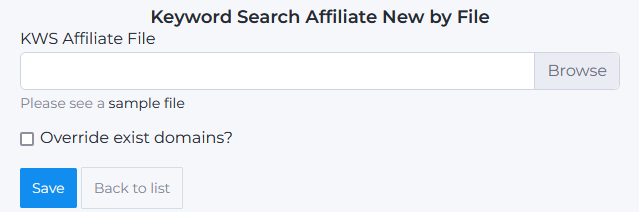
Donwload the sample .XLSX file, fill out the 'Partner', 'Domain' and 'Type' columns and upload the file to the system.

Select the 'Override exist domains' checkbox to update the info of the existing advert. If you do not want to override data, keep the box unchecked.
You can download your domains from the system by clicking the Download.xlsx button.

The tool allows you to filter domain by Type and Partner. Select a partner and advert type and click Filter to apply the selection option.

Bulk Changes - select one or several advert domains in the list to update their type:
Set Good - set the arbitrage status to the website;
Set Bad - deactivate the arbitrage status of the website;
Delete - permanently delete the domain from the system.
